Distort
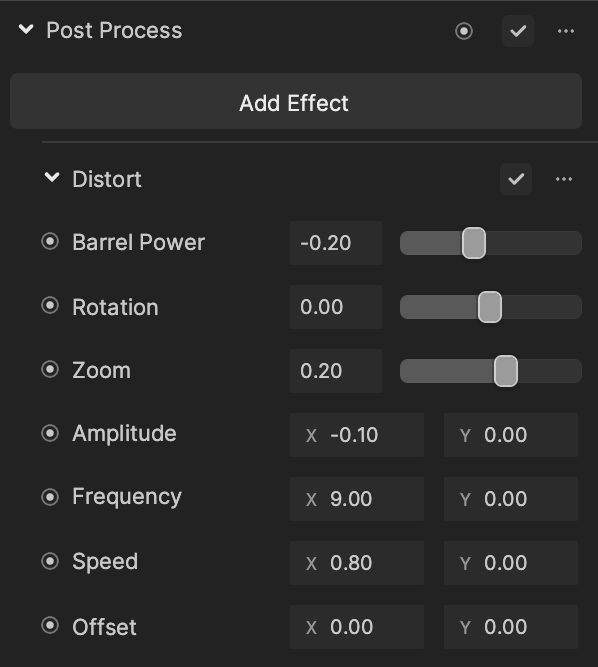
Distort creates a distortion effect where you can control the strength, rotation, and more.
Add Distort
To add a Distort effect:
- Go to the Inspector panel.
- Click + Add Component.
- Go to Post Effect.
- Click Post Process.
- Under the Post Process property, click Add Effect.
- Click Distort.
Properties
| Property | Description |
|---|---|
| Barrel Power | The strength of the distortion. The positive and negative values represent different styles of distortion. Values range between -1.00 and 1.00. See the demonstration below. |
| Rotation | The rotation of the screen. Values range between -360.00 and 360.00. See the demonstration below. |
| Zoom | The zoom level of the screen. Values range between -1.00 and 1.00. |
| Amplitude | Controls the amplitude of dynamic distortion in x and y directions. See the demonstration below. |
| Frequency | Controls the frequency of a dynamic distortion in x and y directions. |
| Speed | Controls the speed of dynamic distortion in x and y directions. See the demonstration below. |
| Offset | Controls the offset to the distortion center (screen center) in x and y directions for a dynamic distortion. |
tip
You must set up non-zero x or y values for Amplitude to see the results of Speed and Frequency values.
Demonstrations
Barrel Power

Rotation

Amplitude


Amplitude Y = -0.25
Amplitude Y = 0.35
Speed


Speed = 1.00
Speed = 3.00