Hair Color
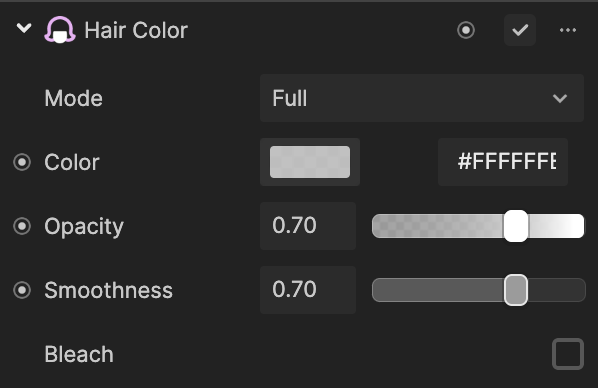
Hair Color enables you to apply color effects to your hair. You can also further customize the hair effect by changing its properties.
Add Hair Color
To add a Hair Color component:
- Go to the Inspector panel
- Click Add Component
- Go to Face Effects
- Click Hair Color
Properties
| Property | Description |
|---|---|
| Full | Applies a single color to your hair. • Color: Chooses the color to be applied to your hair • Opacity: Controls transparency (0–1). 0 is transparent, 1 is opaque. Default: 0.70 • Coverage: Increases color coverage on the hair surface • Bleach: Lightens the hair tone when enabled • Intensity: Strength of bleaching effect (0–1) |
| Two Tone | Applies two different colors to your hair. • Type: Direction of color application — Left and Right or Top and Bottom • Color 1: First color • Opacity (Color 1): Transparency (0–1). Default: 0.70 • Color 2: Second color • Opacity (Color 2): Transparency (0–1). Default: 0.70 • Gradient: Transitions between colors • Coverage: Increases color coverage on the hair surface • Flip: Reverses the color direction • Bleach: Lightens the hair tone when enabled • Intensity: Strength of bleaching effect (0–1) |
| Streaks | Applies several colors to streaks of your hair. • Color 1–4: Select up to four colors • Opacity (per color): Transparency (0–1). Default: 0.70 • Coverage: Increases color coverage on the hair surface |
| Custom Texture | Imports your own textures and applies them to your hair. • Texture: Choose a texture from the Assets panel • Opacity: Controls texture transparency (0–1). Default: 0.70 • Coverage: Increases texture coverage on the hair surface • Blend Mode: Blending math for color/texture. Options: Normal, Darken, Multiply, Lighten, Screen, Linear Dodge, Color Burn, Color Dodge, Overlay, Soft Light, Difference, Exclusion • Bleach: Lightens the hair tone when enabled • Intensity: Strength of bleaching effect (0–1) |