Full Body Sync
The Full Body Sync model animates a static image to mimic the face, lip, and body movements from a reference video, creating realistic, coherent motion through a video-to-image transformation process. High quality results begin with selecting a strong reference video. Following the best practices below will help you capture footage that produces stable, expressive, and visually appealing animations.
| Montagem Miau | 67 On a Merry Rizzmas | Mi Luna (Slowed) | MENTE MÁ |
|---|---|---|---|
Open Full Body Sync
To open Full Body Sync in AI Editor:
- Open Effect House and navigate to the Tool Bar
- Go to AI Library
- Select Video Model
- Select Full Body Sync

Alternatively, click Add Object in the Hierarchy panel, go to AI Editor, and choose Full Body Sync
Reference Video Requirements
The quality of your reference video is critical. To achieve the best results, ensure your video settings and content align with the following specifications.
Recommended More Settings
| Settings | Recommended | Description |
|---|---|---|
| Motion Intensity | 0.39 | Body motion filter that controls how many motion signals are applied. Range [0.3–1.0]. |
| Motion Clarity | 2 | Controls motion clarity by adjusting the number of strong motion signals. Range [2–6]. |
| Target Frame Rate | Default 24 fps | Controls overall motion smoothness. Higher frame rates result in smoother motion.
|
Recommended Frame Rate
For reference videos longer than 10 seconds, adjusting the frame rate helps prevent output duration from being shortened.
| Video Length | Recommended Frame Rate | Description |
|---|---|---|
| Less than or equal to 10 seconds | 24 fps | Keeps the default frame rate to ensure the output duration is not compressed and motion remains smooth. |
| Greater than 10 seconds | 20–15 fps | Reduces frame rate to avoid instability and facial distortion. Recommended not to go below 15 fps. |
Frame Rate Examples
Each example below uses the following reference video.
| Frame Rate | Video Effect | Description |
|---|---|---|
| 30 fps | Setting a too-high frame rate can significantly shorten the output duration. | |
| 24 fps | For reference videos under 10 seconds, 24 fps is recommended to ensure full effect and smooth motion. | |
| 15 fps | For reference videos over 10 seconds, 15–20 fps is recommended based on the video length. Motion may be slightly choppy, but video duration will be preserved. | |
| 10 fps | Setting the frame rate too low can cause stiff movements, facial distortion, and blurriness, affecting output quality. |
Video Content Guidelines
Follow these guidelines to ensure the subject, motion, and framing of your reference video produce accurate and visually consistent results.
Clear Subject
The main subject should remain unobstructed and not noticeably blurry, so motion features can be accurately recognized.
| Good example | Generated effect | Bad example | Generated effect |
|---|---|---|---|
Motion Range
Movements should be smooth and stable. Avoid prolonged side-facing poses or overly exaggerated actions such as somersaults or pole dancing. Half-body dance videos typically produce better motion transfer results than full-body dance videos.
| Good example | Generated effect | Bad example | Generated effect |
|---|---|---|---|
Pose Posture
Choose upright standing poses and avoid high-difficulty movements such as sitting or squatting.
| Good example | Generated effect | Bad example | Generated effect |
|---|---|---|---|
First-Frame Requirements
Make sure the first frame shows the full person and contains complete visual information with no missing parts.
| Good example | Generated effect | Bad example | Generated effect |
|---|---|---|---|
Subject Requirements
Only single-person videos are supported. Avoid videos that include multiple people, animals, or other subjects.
| Good example | Generated effect | Bad example | Generated effect |
|---|---|---|---|
Image Requirements
The image you provide plays a key role in generating accurate and consistent results. To ensure the model can correctly match your image to the reference video, make sure it meets the following compatibility guidelines.
Subject Compatibility
To achieve the best results, the pose and proportions in your image should closely align with those in the reference video:
- The initial pose in your image should match the starting pose in the video. For example, if the video begins with a standing pose, your image should also show a standing pose.
- The subject's proportions should be consistent between your image and the video. For example, if the video shows a full-body subject, your image should also be full-body.
Examples
Each example below uses the following reference video.
| Good example | Bad example | Bad example |
|---|---|---|
 Half body | 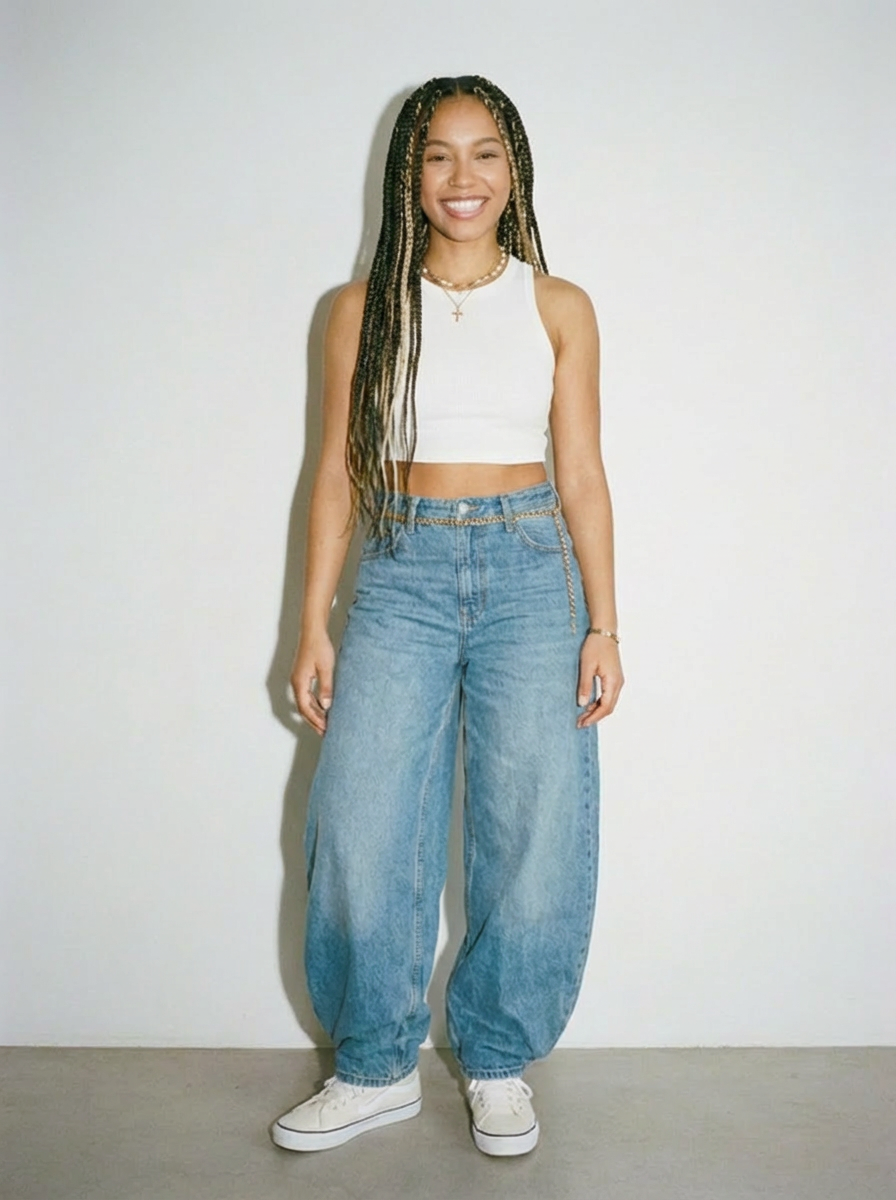 Full body |  Close up |
Reference Video Examples
Here are some examples of different reference videos and their generated effects. Feel free to use these for inspiration when creating your own Full Body Sync effect!
| Name | Reference video | Generated effect | Generated effect | Generated effect | Generated effect |
|---|---|---|---|---|---|
| Montagem Miau | |||||
| Mi Luna (Slowed) | |||||
| VEKI VEKI (Slowed instrumental) |
Guidelines
Please make sure your generated content adheres to the following guidelines:
- Avoid including religious extremism, attacks on religious beliefs, or incitement of hatred or discrimination
- Avoid generating violent threats, abuse, terrorism, or incitement to harm individuals or groups
- Avoid generating obscene or pornographic material, sexual content involving minors, sexual violence, or adult sexual services
- Avoid generating illegal or dangerous content such as criminal activity guides, drug production, weapon manufacturing, hacking, or fraud
- Avoid generating instructions for illegal activities or fraudulent methods
- Avoid generating content that incites subversion, spreads false political information, or endangers social stability
- Avoid generating false medical advice that could lead to health risks
- Avoid inappropriate or illegal content involving minors